Cameras this program tests against







And others. Bring whatever you run: if it is not listed, put it on the request and the team will tell you what it will take.
How it works
List the cameras you want tested: manufacturer, model, serial, roughly how old, how they are cabled and powered. Photos help. Mark each one to ship or to have an equivalent sourced.
Equipment is checked in against your list and built into the demo environment, usually within three business days of arriving. You get the check-in record so you know exactly what we have.
You get your own login and run your evaluation: compatibility, quality, analytics, integrations. Ask for changes as you go. When you are satisfied, your equipment ships home and the findings follow.
What you actually get
A system you can test, not a PDF
The deliverable is access. Once your cameras are built into the Cloud Connector demo environment, you get your own login and run the evaluation yourself from any browser: compatibility model by model, image quality, the advanced analytics, and whatever you asked to have integrated. Put your own people on it. The written findings follow at the end, but the point is that your team proves it with your own equipment before you decide anything.
What you test
Compatibility
- Confirm each camera model connects at all
- Validate ONVIF compatibility and credentials
- Find the firmware level each model needs
- Confirm nothing disrupts the recorders we run today
Video quality
- Check image quality and frame rate over a connection like ours
- Measure bandwidth used per camera
- Test cloud retention, export and playback
- Compare quality against what our recorders give us today
Advanced analytics
- See which analytics run on the cameras we already own
- Test people and vehicle search
- Test alerting on unusual behavior
- Judge how many false alerts we would actually get
Integrations
- Test access control alongside video
- Connect another system we run and see it work
- Evaluate the Avigilon Alta or Unity path for our sites
- Check what our team's day to day would look like
What an Avigilon Alta or Unity path would actually look like for your sites is on that list too. Anything not on it goes in the request as your own line: the team builds for whatever you name, and says up front if something cannot be tested on a bench.
What your cameras get connected to
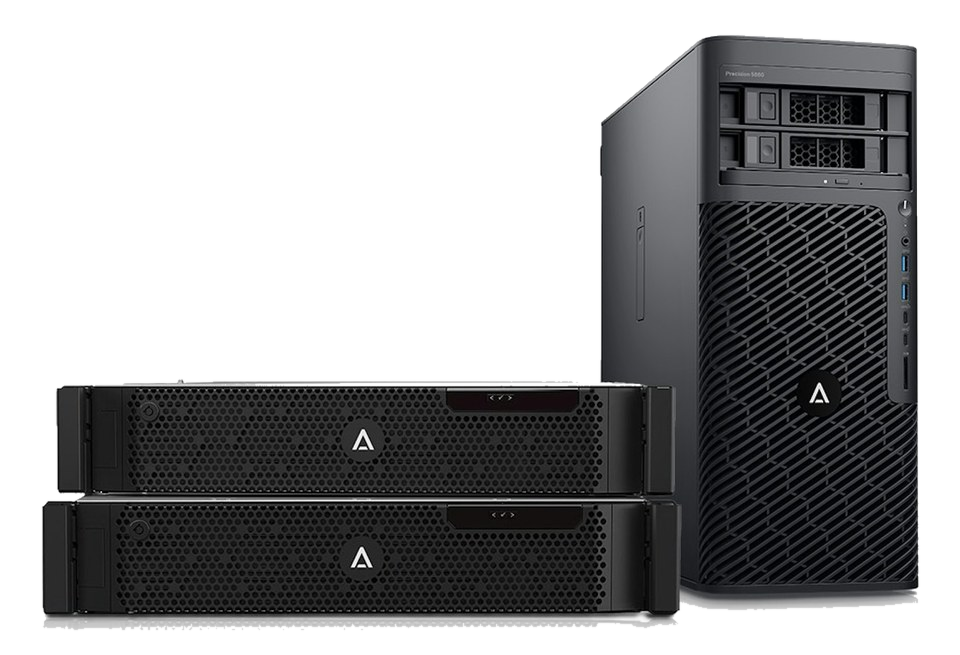
An Avigilon Alta Cloud Connector is a piece of hardware that sits on your network and brings cameras you already own into Avigilon Alta Video. Your cameras keep doing what they do. The connector does the talking to the cloud, which is what makes the analytics and the remote access possible without replacing anything on a wall.
That is the thing this program lets you try against your own equipment before you buy any of it. The bench runs the same hardware you would run.

The two form factors
For a single site or a small group of them. Compact enough for a closet or a counter.
For larger sites and distribution centers, in a rack beside what you already run.
Tell us your camera count on the request and the team puts the right one on the bench. You are not choosing hardware at this stage.
Two ways to get equipment on the bench
Ship your cameras
Mark a camera to ship and your status page produces a shipping order. Freight is billed to Motorola Solutions on both legs, so nothing is invoiced to you. Print the order, put one copy in the box and one on the carton.
Best when the model is unusual, the firmware is specific to your site, or the answer has to be about your exact units.
Have equivalents sourced
Mark a camera to source and the team finds a matching unit for the bench. Nothing leaves your site and nothing comes off a wall.
Best when the cameras are in production, when you cannot take a view offline, or when you only need the model answered rather than the individual unit.
You can mix the two. Each camera on the request is marked on its own.
More than cameras
The same bench covers the wider Motorola Solutions range, so one test can answer more than one question: Avigilon Unity, Avigilon Alta, Avigilon Alta Access, Pelco, video intercom, license plate recognition, and radio and dispatch tie-ins. Tick what you want included on the request.
Advanced system integrations
If video has to work alongside something else you run, ask for it as an integration. Access control, intrusion panels, point of sale, warehouse and ERP systems, identity providers, central station monitoring, or a custom API. Tell us the vendor, the product, and what should happen when the two are connected. The team scopes it, tests what can be tested on the bench, and tells you plainly what it would take, including anything that has to come from the other vendor. You can add integration requests at any time from your status page, including after the test is finished.
The timeline
Every request moves through the same steps. You get an email at each one, and your status page always shows where the request sits and what the target date is.
-
1Request Received Program coordinator | target 1 business dayYour request is in. A coordinator checks the list, your Avigilon representative confirms what you are setting out to test, and you hear back the same day if anything is unclear.
-
2Equipment Staging You | target 7 business daysUnits you marked to ship are on their way, and equivalents for anything you kept on site are being sourced. Shipping is paid by Motorola Solutions, and the faster the box leaves your dock the sooner you are testing.
-
3Configuration Integration team | target 3 business daysYour equipment is checked in against your list and built into the demo environment on Cloud Connector, set up to mirror your sites. You get the check-in record so you know exactly what we have. Nothing touches your production system at any point.
-
4Your Testing Window You | no time limitThis is what the program delivers, and it runs for as long as you need it. You get your own login and test your own equipment: compatibility by model and firmware, image quality, the advanced analytics, and the integrations you asked for. Ask for changes as you go and the team makes them. Nothing ends until you say so.
-
5Return and Wrap-up Integration team | no time limitOn your word, your equipment ships home, again paid by Motorola Solutions, and the written findings follow. There is no clock on this: tell us when you are ready.
-
6Complete ClosedThe review is closed. You can still send follow-up and integration requests from this page at any time.
Targets are business days spent in each step and they exclude weekends. A request submitted today would have you testing your own equipment around November 17, 2026, about eleven business days. The last two steps carry no date on purpose: your testing window runs as long as you need it, and nothing ships back until you ask. How fast the box leaves your dock is the usual reason a real request runs longer.
Common questions
Does any of this touch our live system?
No. The test runs on separate equipment at the test center. Cameras you keep on site are never reconfigured, and nothing is installed on your recorders or your network.
What does it cost?
Nothing. The bench time, your access to the demo environment, the written findings, and freight in both directions are all covered. There is no card to enter anywhere on this site.
What happens to our equipment?
It is checked in against your list when it arrives and you get that record, so you always know what we are holding. It ships back once you tell us you have seen what you need.
How long do we keep access?
For the whole review, and we will extend it if you ask. Nothing is torn down until you confirm on your own status page that you are done.
Who sees our information?
Your Avigilon representative, the integration team running the bench, and you. Every status update goes to all three at the same time. Your status link is unguessable, and anyone you forward it to can see the request.